
Captaining shouldn't feel like a second job

Your entire USTA season, one login away.

Sign in to TennisLink once and the season walks in — schedule, roster, NTRP ratings, results, even the RSVPs you've already collected. Then availability, lineups, and team chat leave the group thread.

Free for captains and players — in English, 한국어, 中文 & Español.

Season schedule Roster & NTRP Results & standings Free — no per-team fees
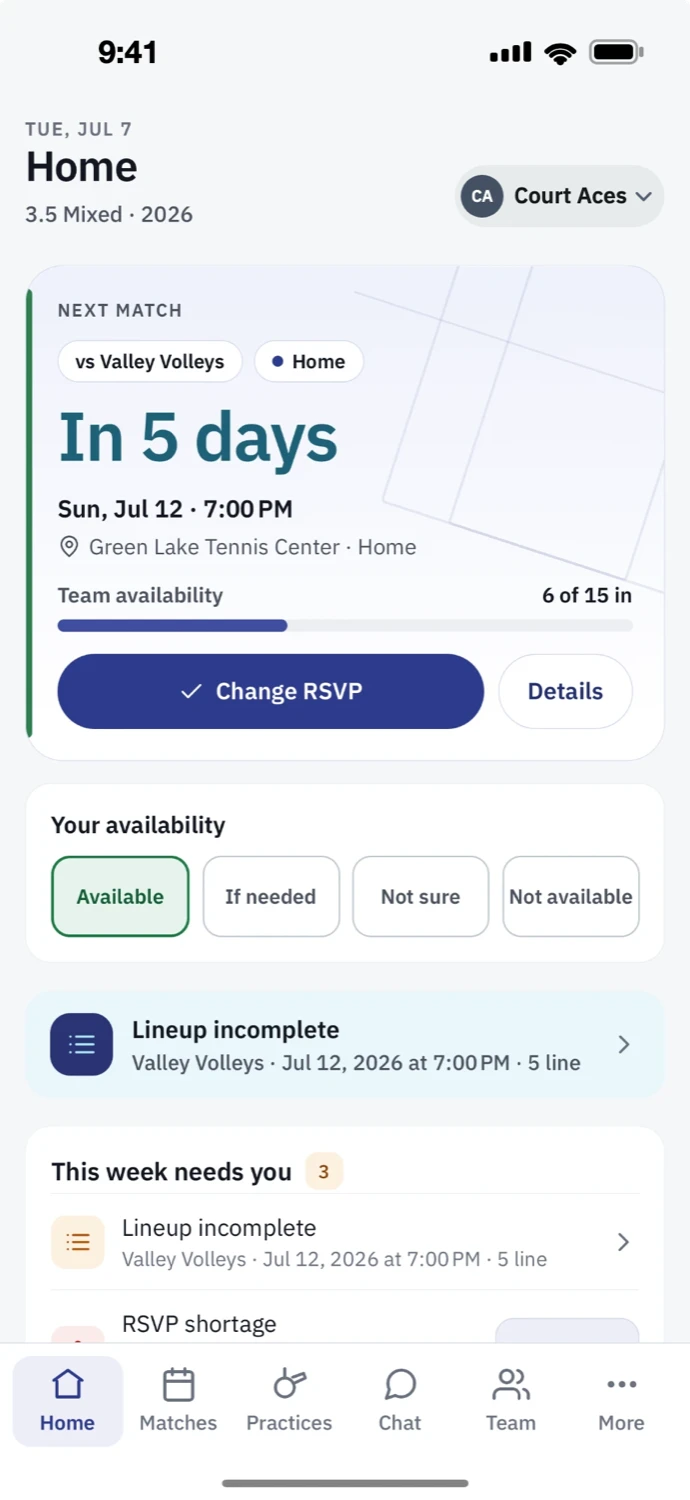
The Court Squad home screen: next match vs Valley Volleys in 5 days, team availability at 6 of 15 in, your RSVP set to Available, and this week's captain tasks.

Watch

Who’s in this week? Now it’s one tap.

RSVPs, lineups, TennisLink sync, and team chat — the whole match week in one app.

01 The import

Connect once. The whole season walks in.

No spreadsheet to migrate, no schedule to re-type. Connect your team once — Court Squad pulls the whole season in, and keeps results and ratings in sync after every match.

  1. 1

    Connect your USTA team

    Sign in and point Court Squad at your team. That's the whole setup. Step-by-step guide →

  2. 2

    We pull everything in

    Schedule, roster, NTRP ratings, and last season's results — automatically.

    Automatic · no re-typing
  3. 3

    Invite your team by link

    Share one link. Players join and confirm availability in a tap.

  4. 4

    Set your first lineup

    Availability and ratings are already there. Build it and send.

02 Switching

Already mid-season? Already using something? Nothing gets lost.

Moving your team is the part every captain dreads. Here it's mostly done for you — and it works alongside what you already use.

Mid-season is fine. You pick up where you are.

Whatever's on TennisLink comes with you — this season's schedule, roster, results so far, and any availability your players have already entered there. Nothing to rebuild, nothing to re-ask. How the import works →
Your players do almost nothing.

You can run the season before a single teammate installs anything — roster, schedule, and results are already in. When a player taps your invite link, they land on your roster in about a minute, and RSVPs are one tap from there.

RSVPs in a spreadsheet or another app?

Send the file to support@courtsquad.us and the availability data gets moved into Court Squad for you — free, nothing to re-type. Your team starts with its history intact.

Scores still get entered on TennisLink — Court Squad works alongside it, not instead of it, and keeps pulling results and ratings from there after every match.

03 Sound familiar?

If any of this hits home, you're the reason we built this.

The team group chat82 unread
Thursday 9:14 PM Who's in for Saturday?? Need answers by tonight 🙏 maybe — checking with my wife what time do we start again? anyone selling a used Pro Staff? Friday 11:42 PM …so is that 7 players or 8? Starting the spreadsheet over.
Court Squad · Sat vs Cedar ParkReady
Availability9 in · 1 out
Haven't replied2 → nudged in one tap
LineupSet · passes league rules
Your Friday nightYours again

Court Squad takes the chase off your plate. One place the whole team actually opens — and it updates itself.

04 What changes

Less chasing. More tennis. Here's what changes.

See it, then act on it

Know who's in — and nudge the rest in one tap.

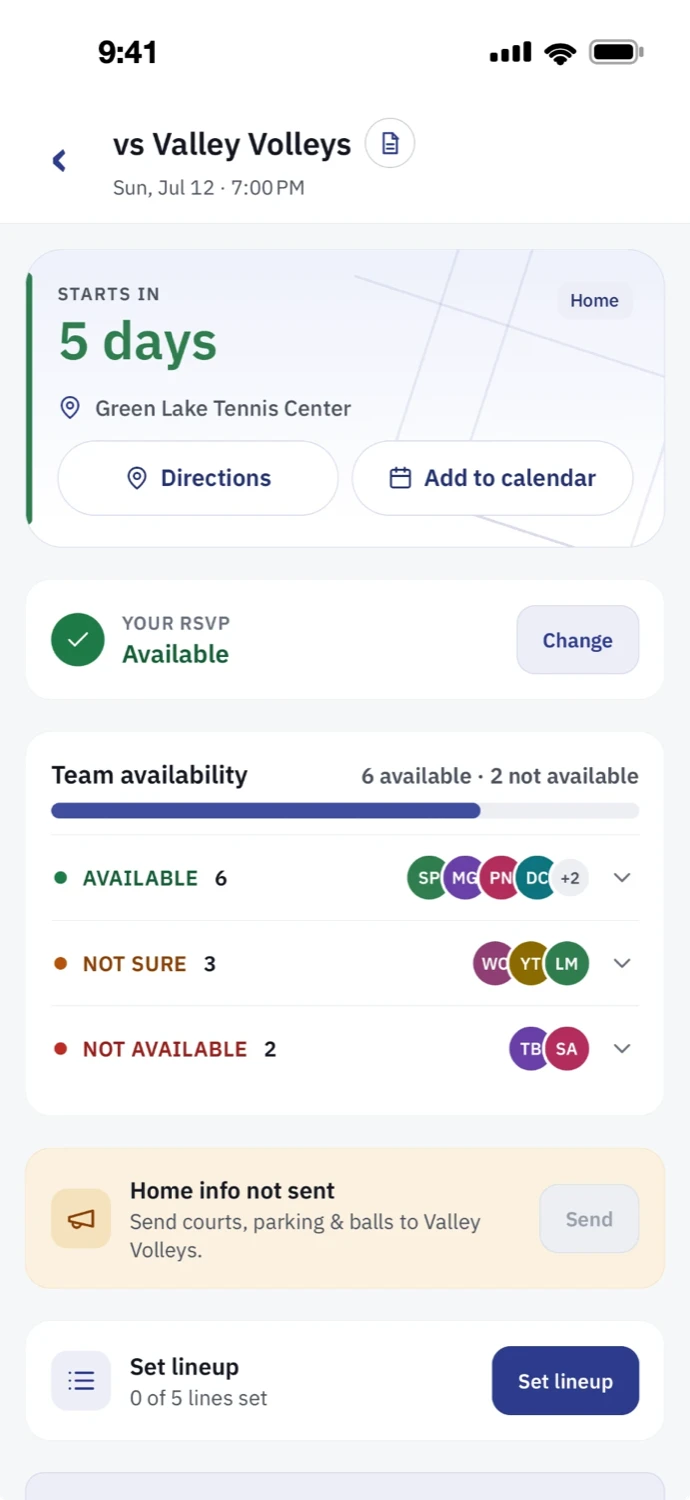
Every player taps in, out, or unsure. You see the whole team's status for Saturday at a glance, then send a reminder to just the ones who haven't replied — no more individual texts.

A real match screen: your RSVP is Available, team availability shows 6 available, 3 not sure, and 2 not available with player avatars, a reminder to send home-court info, and a set-lineup button.

Default-risk radar

See the match you're about to forfeit — weeks ahead.

Court Squad watches availability across the whole season and flags the matches where you can't yet field a full lineup — while there's still time to call in a sub instead of defaulting a line.

Season readiness10 matches

Wk 1ready
Wk 2ready
Wk 3on track
Wk 4thin
Wk 5ready
Wk 6needs you
Wk 7on track
Wk 6 · vs. Riverside — only 5 confirmed for 8 spots. Line 3 doubles at risk.

Rules-aware lineup assist

Build a lineup that actually passes league rules.

Drop available players into singles and doubles spots. Court Squad checks line-strength order and combined-NTRP limits against your league's rules — and flags anyone who's out — before you submit a line you'd have to redo.

Lineup · SatNTRP shown

S1DRDana R.4.0
D1MTMarcus T. · Priya S.3.5 / 3.5
D2JKJamie K. · Sofia L.4.0 / 3.5
S2+Tap to fill from 6 available
Line-strength order valid
D1 combined NTRP within limit7.5 / 8.0

Team communication, built in

Keep the team talking — without the 80-message group chat.

Announcements, polls, and match talk live right next to the schedule, so the important stuff doesn't scroll away. Pin a notice, run a quick poll for practice time, and everyone sees it where it matters — no separate chat app to wrangle.

Lakeside Pros · team chat12 members

Pinned · Captain

Courts confirmed for Saturday. Warm up by 8:45.

MT Marcus T.Can someone cover doubles if I'm 10 min late?
DR You · CaptainGot it — Jamie will start, you sub in.

Poll · Best practice night this week?

Tuesday8
Thursday4

Match day, handled

On match day, it comes to you.

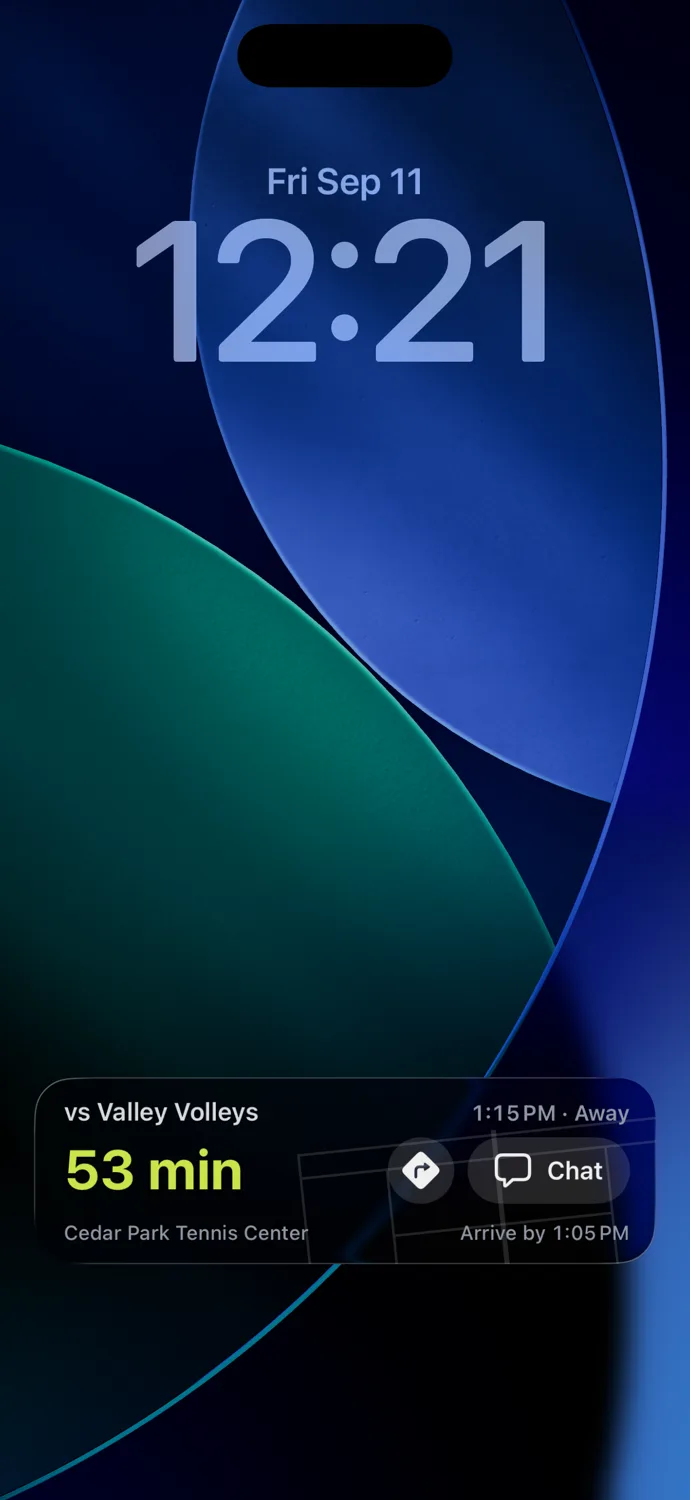
An hour before the match, your iPhone's lock screen has the whole thing — who you're playing, when to arrive, directions to the courts, and the way into the match chat. Nobody has to open an app to remember where they're going.

An iPhone lock screen an hour before a match: vs Valley Volleys, 1:15 PM away, a 53-minute countdown, Cedar Park Tennis Center, arrive by 1:05 PM, with directions and chat buttons.

Ready to try it on your team?

One TennisLink login, start to finish. Free for everyone on the roster.

05 Founding teams

First full season. Help shape what it becomes.

Not a beta. Court Squad is live on the App Store and Google Play, and teams are running their fall season on it right now. What's still open is which features come next — and that's decided by the captains using it.

Court Squad didn't start as a startup idea. The first version was a private app I built for my own team — because our season lived in a group chat, a spreadsheet, and a stack of TennisLink tabs. That app has quietly run real league seasons since: the team chat, the availability taps, the results that file themselves.

Court Squad is the same idea, rebuilt so any USTA team in the Pacific Northwest can use it. It's free, there are no ads, and your team's data stays your team's.

This is its first full season, and I'm looking for teams to run theirs on it and tell me what's missing. There's no company behind it — you get me. Questions go to my inbox, not a ticket queue, and captain requests have been shipping within days, not quarters. If it hands one captain their Friday night back, it's doing its job.

S SanghoBuilder of Court Squad · Pacific Northwest
Direct line to the builder — support@courtsquad.us Captain requests ship in days Built by a captain in the Pacific Northwest Free, no ads, private by default Speaks your language — English · 한국어 · 中文 · Español

Court Squad is an independent app; “USTA” refers to United States Tennis Association league play for description only, and Court Squad is not affiliated with, endorsed by, or sponsored by the USTA.

06 FAQ

The questions captains ask first.

Do all my players need to install the app?

Not to get started. The moment you connect, you have the full roster, schedule, ratings, and results — and you can run the season from there. Players join when they tap your invite link; each one takes about a minute. Anyone who hasn't joined yet still shows on your roster, so you never lose sight of the team.

We're already mid-season. Is it too late to switch?

No. The import brings this season's schedule, roster, results so far, and any availability your players already entered on TennisLink. You pick up exactly where you are. If your RSVPs live in a spreadsheet or another app, send the file to support@courtsquad.us and it gets moved over for you, free.

Does Court Squad replace TennisLink?

No — it works alongside it. Scores are still entered on TennisLink, and Court Squad keeps pulling results and ratings from there after every match. Court Squad handles the parts TennisLink doesn't: availability, lineups, and team communication.

What happens with my USTA password?

You sign in once on the real TennisLink site — Court Squad never sees or stores your USTA password.

Is it really free?

Yes. Free for every captain and player — no per-team fees, no paywalled features, no ads.

Who can see my team's data?

Only your team. Availability, lineups, and chat are visible to your own roster and nobody else — opponents never see them. Your data isn't sold or shared, and you can delete your account and its data at any time. Details are in the privacy policy.

Which phones and languages does it support?

iPhone and Android, in English, 한국어, 中文, and Español — every teammate picks their own language.

What if something goes wrong during setup?

Email support@courtsquad.us. Replies come from the person who built Court Squad — not a ticket queue — usually the same day.

Got a text from your captain?

Tap the link in that text — it carries your team invite and opens the app. No link? Ask your captain for one, or join with your USTA team number inside the app.

07 Download

Your season is already on TennisLink. Bring it over.

Court Squad is free for every captain and player — no per-team fees, no paywalled features. Get the app, connect your team once, and the season imports itself.